
Apple HomeView: Price, Features, Release Date & What to Know
- Tech US News
 Lisa Martin
- 10 minutes read

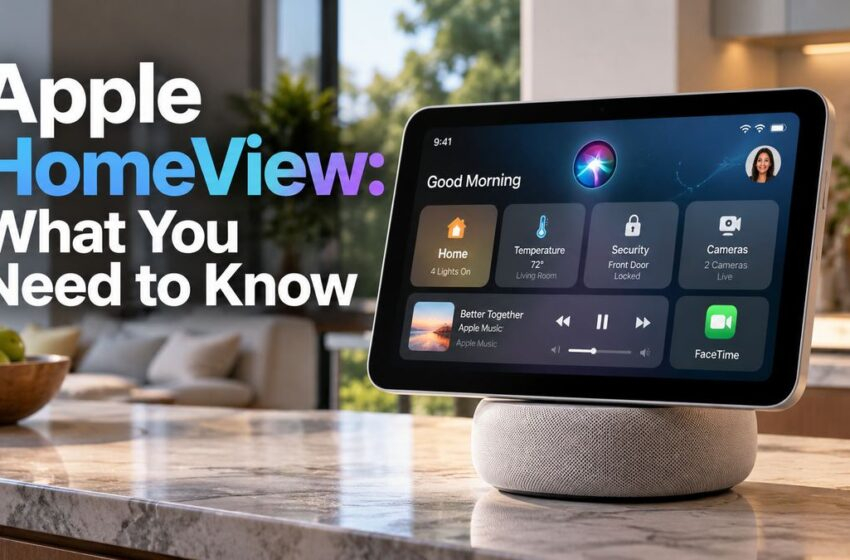
Apple HomeView smart display for Siri, FaceTime and smart-home controls.
Apple is making a bigger push into the smart-home market with a new device called Apple HomeView. The company describes it as a new way to enjoy entertainment, stay connected with family, and manage compatible smart-home devices from one place.
Unlike a traditional smart speaker, HomeView combines a touchscreen, Siri, FaceTime, personalized information, and smart-home controls in a compact display designed to sit on a table or be mounted on a wall.
What Is Apple HomeView?
Apple HomeView is a 7-inch smart-home display built around Apple’s ecosystem. It is designed to give users a central screen for everyday information, entertainment, communication, and home controls.
The display can show personalized content for different people in the household, while Siri can be used to control supported devices and perform everyday tasks. Apple says the system can recognize up to six people and provide personalized experiences for each user.
Apple HomeView Features
1. 7-Inch Liquid Retina Display
The HomeView features a 7-inch Liquid Retina display. Its compact size makes it suitable for a kitchen counter, bedside table, desk, or other central location in the home.
2. Siri With Apple Intelligence
One of the most important parts of HomeView is its integration with Siri and Apple Intelligence. Instead of relying only on traditional touch controls, users can interact with the device using voice commands.
This makes HomeView useful for checking information, controlling compatible smart-home products, and interacting with Apple services without reaching for an iPhone.
3. Personalized for Multiple Family Members
HomeView is designed for shared household use. Apple says it can recognize up to six people and personalize the experience for each person.
That can include personalized information, photos, music, apps and widgets, making the display more useful than a basic shared smart speaker.
4. FaceTime on a Dedicated Screen
HomeView also works as a communication device. FaceTime allows users to make video calls from the display, while Center Stage helps keep participants framed during calls.
5. Smart-Home Controls
Apple is positioning HomeView as a central control point for the connected home. Users can manage compatible lights, locks, thermostats, cameras and other smart-home accessories through the device.
HomeView can also work with compatible Matter accessories and Apple’s broader Home ecosystem, giving users a central place to see and control supported devices.
6. Home Monitoring
HomeView can help users keep an eye on connected cameras and other supported security devices. Apple says the Home Camera face can show up to nine video feeds at once.
7. Tabletop or Wall-Mounted Design
Users can place HomeView on a table or choose a separate wall-mounted model. This gives homeowners more flexibility depending on where they want their smart-home control center.
Apple HomeView Key Specifications at a Glance
| Feature | Apple HomeView |
|---|---|
| Display | 7-inch Liquid Retina |
| Assistant | Siri AI powered by Apple Intelligence |
| Users | Up to 6 people |
| Video calls | FaceTime with Center Stage |
| Smart-home control | Compatible Apple Home and Matter accessories |
| Camera viewing | Up to 9 video feeds |
| Placement | Tabletop or wall-mounted |
| U.S. starting price | $299 |
| Availability | November 13, 2026 |
How Much Does Apple HomeView Cost?
Apple HomeView starts at $299 in the United States. Apple began taking preorders on October 13, 2026, with availability scheduled for November 13, 2026.
That puts HomeView into a higher price range than many basic smart displays from competing ecosystems. Apple is clearly targeting customers who already use iPhone, Apple services and other Apple devices.
Apple HomeView vs. Amazon Echo Show and Google Nest
HomeView enters a market already served by Amazon and Google. Devices such as the Echo Show and Google Nest Hub have offered smart-home controls and screen-based assistants for years.
Apple’s advantage is its tight integration with the Apple ecosystem. HomeView is designed to connect naturally with Apple services, FaceTime, Siri, personal profiles and compatible Home accessories. If you are also following Apple’s latest smartphone lineup, see our Apple iPhone 17 Pro Max coverage.
The trade-off is that users who prefer a more open smart-home ecosystem may find Apple’s approach less flexible than platforms that support a wider range of third-party services.
What Makes Apple HomeView Different?
The biggest difference is how Apple combines a shared household screen with personal experiences. HomeView can recognize individual users and switch to their personalized Home Screen and content.
Apple is also putting Siri AI at the center of the experience rather than treating the display as simply a screen attached to a speaker. With a compatible Apple Intelligence-enabled iPhone or iPad, Siri can use personal context from supported apps to provide more personalized responses.
For someone already invested in Apple devices, that integration could be more important than raw hardware specifications.
Privacy and Security
Privacy is another major part of Apple’s HomeView pitch. Apple says privacy and security are built into the product and its smart-home experience.
Apple says HomeView and its A18 chip use Secure Exclaves to isolate camera and microphone processing. Personal content such as Messages and Calendar is designed to appear only when the recognized user is present and the paired device meets Apple’s security requirements.
For consumers considering a smart display for a private area of the home, these controls could be an important factor when comparing HomeView with competing devices.
When Will Apple HomeView Be Available?
Apple announced HomeView on October 13, 2026. Preorders started immediately in the United States, while general availability is scheduled for November 13, 2026.
Apple says HomeView will also be available in several other markets, including India, the UK, Canada, Australia and New Zealand. Availability and features can vary by region, so buyers outside the United States should check local Apple availability before purchasing.
Is Apple HomeView Worth Buying?
HomeView makes the most sense for people who are already heavily invested in Apple’s ecosystem and want a dedicated screen for their home.
If you already use an iPhone, FaceTime, Apple Music and compatible Home accessories, the combination of those services in one dedicated display could make HomeView useful in everyday life.
However, buyers who mainly want an inexpensive smart display may find cheaper alternatives from Amazon and Google. The $299 starting price means HomeView is positioned more as a premium Apple ecosystem device than a budget smart-home screen.
Bottom Line
Apple HomeView is more than a smart display. It is Apple’s attempt to create a central interface for the connected home while bringing together Siri AI, Apple Intelligence, FaceTime, entertainment, personalization and smart-home controls.
Its biggest appeal will likely be to existing Apple users who want a dedicated screen in the home rather than relying on an iPhone for everything. Whether it becomes a major competitor to Amazon and Google will depend on how well Apple’s ecosystem, third-party support and Siri experience work in everyday use.
For the latest official specifications, pricing and regional availability, see Apple’s HomeView announcement.
Frequently Asked Questions
What is Apple HomeView?
Apple HomeView is a 7-inch smart display designed for entertainment, communication and control of compatible smart-home devices.
How much does Apple HomeView cost?
The starting price is $299 in the United States.
When will Apple HomeView launch?
Apple says HomeView will be available starting November 13, 2026.
How many people can use Apple HomeView?
Apple says HomeView can recognize and personalize experiences for up to six people.
Can Apple HomeView be mounted on a wall?
Yes. HomeView can be used on a tabletop or with the separate wall-mounted model.
Source: Apple